Start a 14-day trial
Workload & portfolio

Plan the people, then promise the dates

Estimates on tasks become hours on a workload grid, so an overloaded week shows before it happens. Above that, a portfolio roadmap puts every project on one page and says which ones are at risk and why.

Workload

Capacity against planned work, six weeks ahead

Every person has a weekly capacity (40 hours by default, set per person, with their working days). Each week shows the hours of estimate still to go on their open tasks due that week, coloured under, near or over capacity, with tasks that have no estimate counted separately.

  • This week counts only the working days left
  • Overdue work lands in the first week
  • Click a week to see its tasks and reassign one
  • Managers see the projects they run; admins see the company
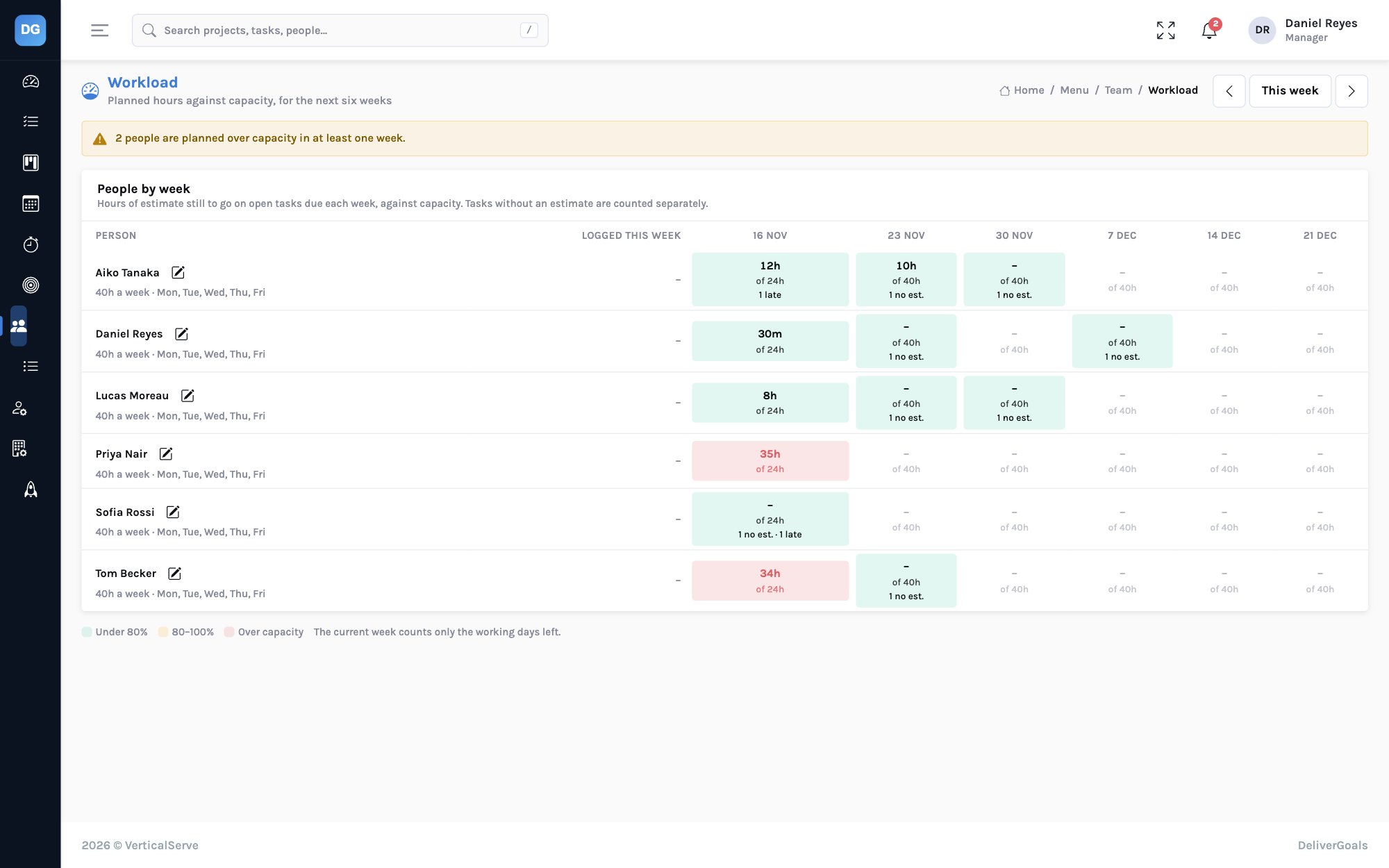
app.delivergoals.com · Workload
Workload for a manager over six weeks from 16 November: an alert that 2 people are planned over capacity; rows for Aiko Tanaka, Daniel Reyes, Lucas Moreau, Priya Nair, Sofia Rossi and Tom Becker, each 40h a week, Monday to Friday; this week’s cells read for example 12h of 24h, 35h of 24h in red for Priya Nair and 34h of 24h for Tom Becker, with counts of tasks with no estimate.
Planned hours from estimates against each person’s capacity, week by week; red means over.
Portfolio

Every project on one roadmap

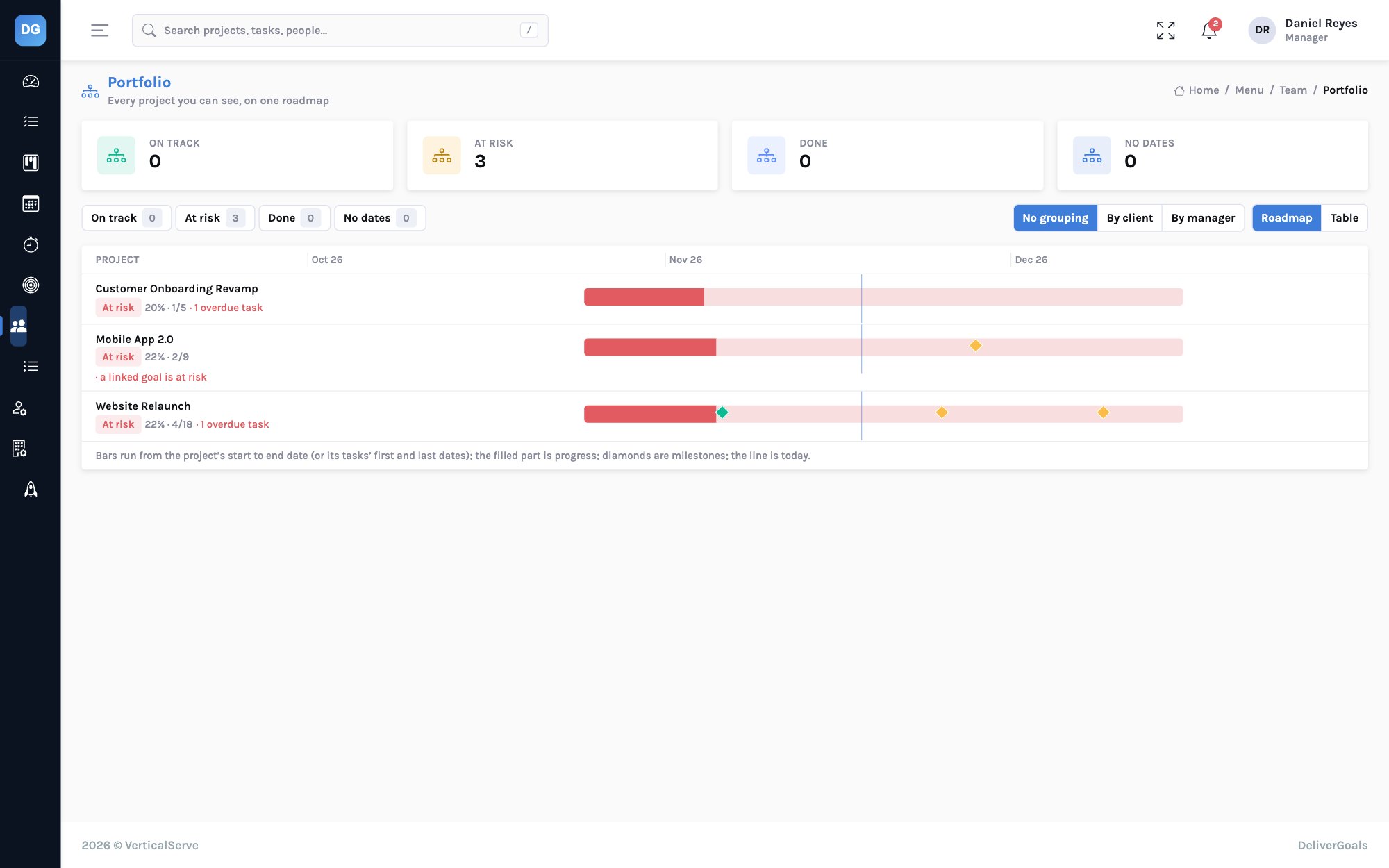
Each project is a bar from its start to its end (or its tasks’ first and last dates), filled to its progress, with milestones as diamonds and a line for today. A project is at risk when work is overdue or a linked goal is at risk or forecast to be late — and the page says which.

  • Group by client or by manager
  • Filter by status
  • A table view with export
app.delivergoals.com · Portfolio
The Portfolio roadmap: tiles for 0 on track, 3 at risk, 0 done, 0 without dates; bars for Customer Onboarding Revamp (20%, 1 overdue task), Mobile App 2.0 (22%, a linked goal is at risk) and Website Relaunch (22%, 1 overdue task), with milestone diamonds and a line for today; grouping by client or manager and a table view.
Every project on one roadmap, each saying why it is at risk.
Dependencies

What waits on what

On each project’s timeline, arrows run from a blocking task to the work it holds up. A task planned to start before its blocker is due is flagged, so the conflict is visible before it costs a week.
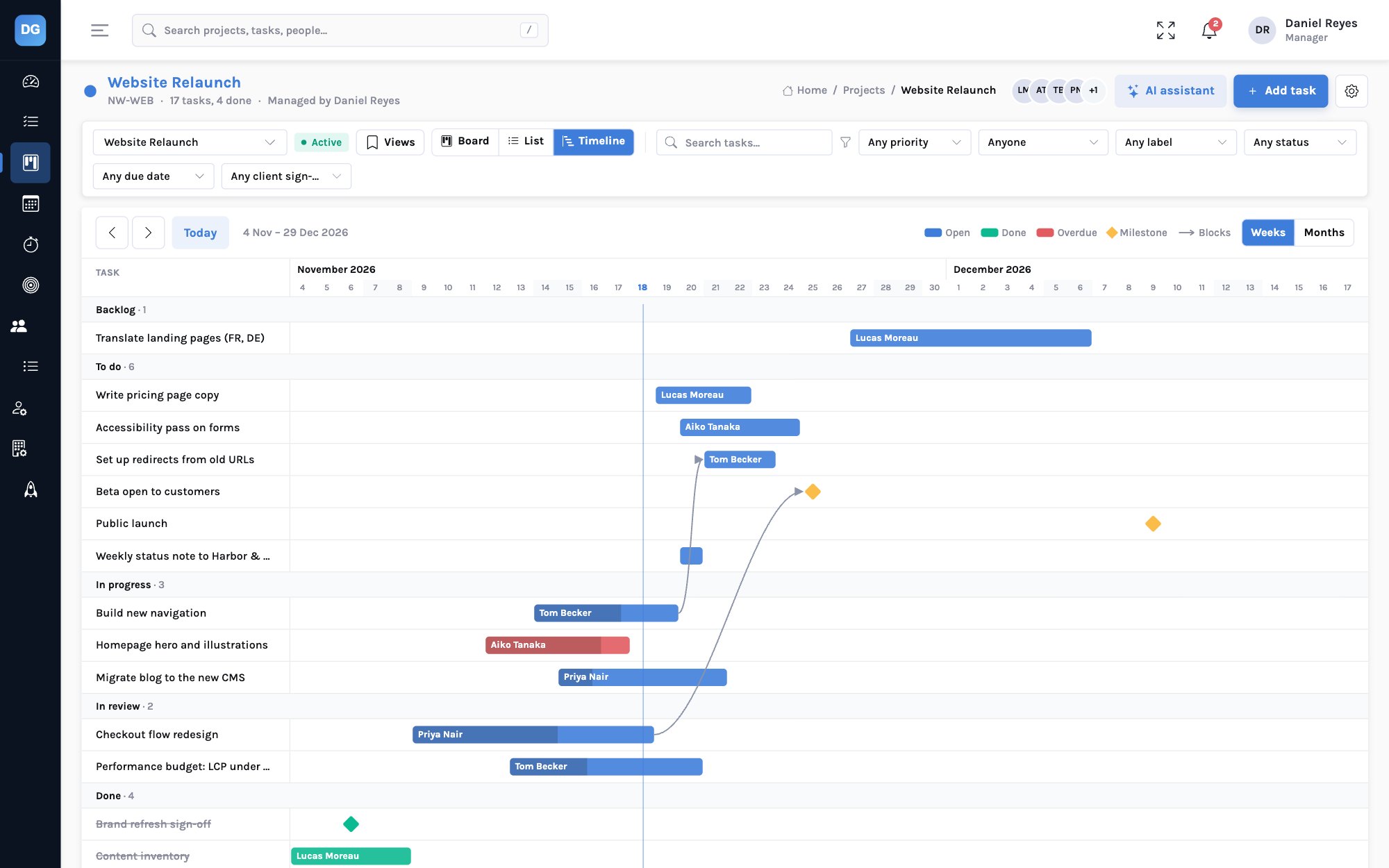
app.delivergoals.com · Website Relaunch · Timeline
The Website Relaunch timeline, 4 November to 29 December 2026, with arrows from blocking tasks to the tasks they hold up, for example from Checkout flow redesign to the Beta open to customers milestone, and a legend entry for Blocks.
Dependencies drawn as arrows from the end of each blocker to the start of what it blocks.
How it works

From an estimate to a decision

From an estimate to a decision 1EstimatesA time estimate oneach task.2WorkloadHours per person perweek againstcapacity.3RebalanceReassign or re-datethe work in anoverloaded week.4PortfolioEach project’s healthand why.5PromiseDates the team cankeep.From an estimate to a decision 1EstimatesA time estimate on each task.2WorkloadHours per person per week againstcapacity.3RebalanceReassign or re-date the work in anoverloaded week.4PortfolioEach project’s health and why.5PromiseDates the team can keep.
Time already logged on a task is subtracted from what is still to go.
Questions it answers

What you can find out

Each answer is on a screen you can open.

Who is overloaded next week?The red cells on Workload
Which tasks make that week too full?Click the cell
Which projects are at risk, and why?The Portfolio page
What is blocked by what?The arrows on a project’s timeline
In practice

What teams use it for

Before saying yes to a client date

Look at the next three weeks of Workload for the people who would do it.

Monday portfolio review

Open Portfolio, read the reasons, and fix the top one.

Spread the load

Move one task from a red week to someone with room.

Where it stops. Workload is only as good as the estimates; tasks without one are counted, not weighed. Capacity is hours per week, not a calendar of leave (use the holiday calendars for that). The portfolio does not plan resources across projects for you.

See your team’s next six weeks

Put estimates on the open tasks in one project and open Workload. The 14-day trial covers up to 10 people.

Start a 14-day trial